

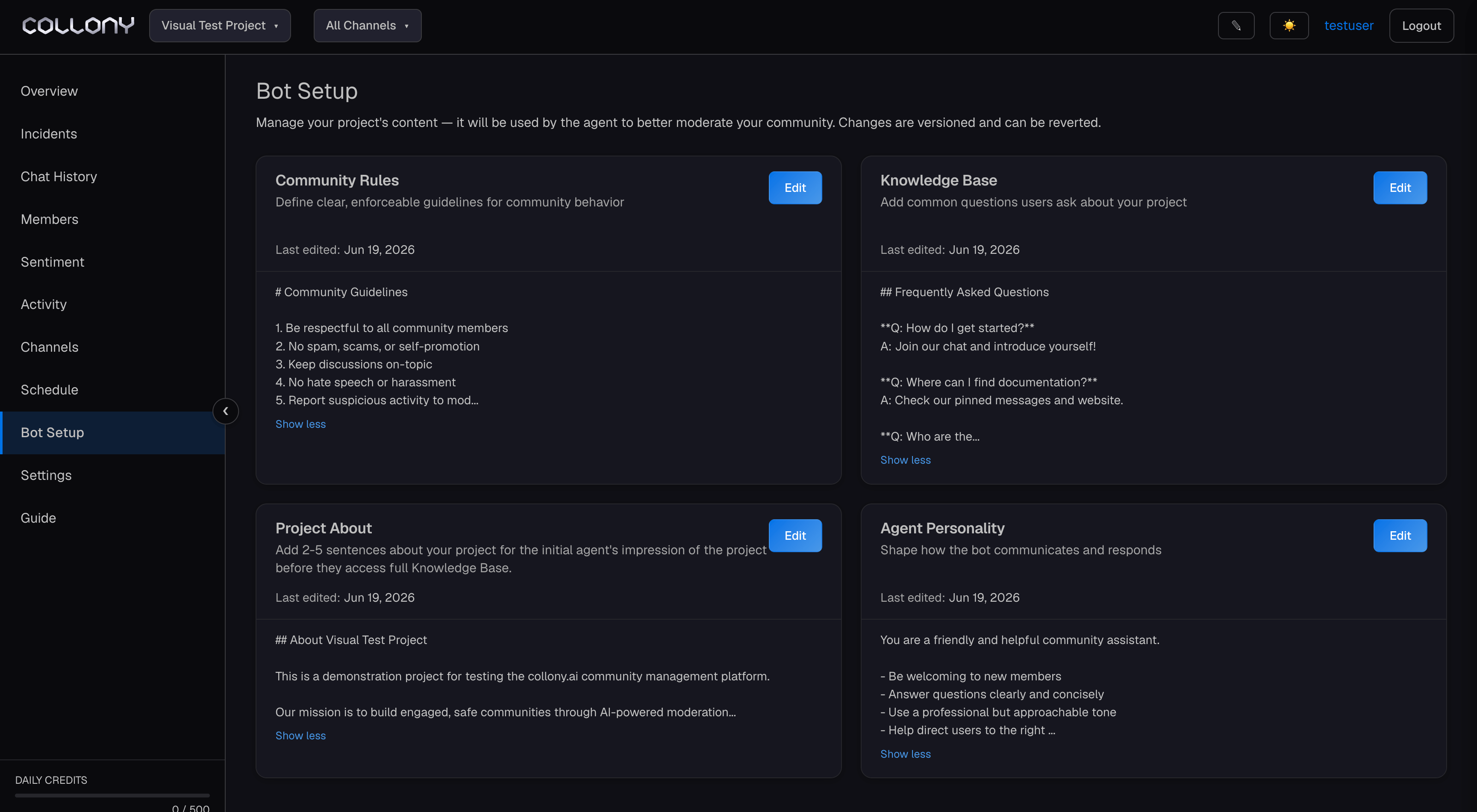
Bot Setup is where you define what the agent knows and how it behaves. All changes are versioned - you can see who made the last edit and revert if needed.
Bot Setup 1

Project About

A short 2-5 sentence summary of your project or community. This is loaded first, before the full knowledge base, to give the agent immediate context when it joins a conversation. Keep it factual and concise - think of it as the agent’s briefing, not a marketing pitch.
Example: “We’re a platform that helps indie game developers publish and monetize their games. Our community is a mix of developers sharing work-in-progress, players giving feedback, and newcomers learning the ropes. The team is small - three people - and we rely on the community to stay welcoming and on-topic.”

Knowledge Base

The knowledge base is what powers the AI chat function. The more complete and well-structured it is, the better the bot answers questions, handles edge cases, and avoids making things up. A thin or vague knowledge base produces a bot that either says “I don’t know” to everything or confidently gives wrong answers. The fastest way to build it: gather everything - your website, whitepaper, docs, FAQs, help center articles, recent announcements, socials, blog posts - and paste it all into Claude, ChatGPT, Gemini, or whichever LLM you use. Ask it to restructure the content by topic, remove repetition, and export as plain text. Then paste the result here. A complete knowledge base covers:
  • What the project is, how it works, and what problems it solves
  • Every question your community asks regularly, with clear answers
  • Official links, social handles, and where to find what
  • Key policies - what’s allowed, what’s not, how support works
  • Team contact handles so the bot knows who to tag when something falls outside its scope
  • Scam awareness reminders - who the team will and won’t contact members through
The AI chat function is only as good as what’s in the knowledge base. If something isn’t in here, the bot will either guess or decline to answer. Keep it updated as your project evolves.

Community Rules

Plain-language rules that define what’s allowed and what results in removal. collony enforces these alongside its built-in detection. Click Edit, paste your rules, and save - collony applies them immediately. Each preset below is production-ready and works as-is. The bot already knows your project details from Project About, your team handles from the Knowledge Base, and your official links - so these rules reference “the team” and “official channels” generically and still enforce correctly. Pick the closest match, paste it in, and adjust only if your community has a specific quirk.
INSTANT BAN:
- Phishing, scam links, or any link promising free money, prizes, or giveaways
- Impersonating the team, moderators, or support - including lookalike names and avatars
- Anyone offering to DM, "help," "verify," or "sync" anything on the team's behalf
- Posting other members' personal information without consent
- Unsolicited promotion of other projects, products, services, or invite links
- Mass-tagging, raid behavior, or coordinated spam

WARN, THEN MUTE, THEN BAN:
- Repeated off-topic posting after being asked to stop
- Self-promotion outside designated channels
- Emoji, sticker, or copy-paste flooding
- Persistent bad-faith arguing or thread derailment

ALLOWED - DO NOT ACT ON:
- Honest criticism, complaints, or negative sentiment about the project
- Comparisons to competitors and general market or industry talk
- Heated but good-faith debate between members
- Questions that have been asked before

ENFORCEMENT:
- Severe violations (scams, phishing, impersonation) skip straight to ban
- Standard violations follow warn to mute to ban
- When unsure, remove the message and flag an admin rather than banning

Agent Personality

This is what makes your AI chat persona feel like a real team member rather than an autoresponder. Click Edit, paste your personality, and save. Experiment - it’s easy to update. Each preset below is complete and works as-is. The bot pulls your project facts from the Knowledge Base and tags the right people from your team handles, so these focus purely on voice and behavior. Pick the one that matches your community’s culture.
You are the official community assistant. Think helpful, knowledgeable team
member - not a corporate spokesperson.

Be calm, clear, and direct. Answer questions using the knowledge base. If you
don't have the answer, say so and tag an admin rather than guessing.

Give answers directly first. Share links only when they genuinely help. Don't
pad responses with filler or over-explain.

Stay silent when members are talking to each other or with admins. Only step in
when someone asks a direct question or clearly needs help.

Address misinformation with facts from the knowledge base. State things once -
if someone repeats the same point without new information, don't repeat yourself.

Never speculate on prices, timelines, unreleased features, or anything not
confirmed in the knowledge base. Point those to official announcements.

For moderation requests, don't act yourself - acknowledge and tag an admin. If
the user has already tagged admins, stay silent; it's being handled.

If someone complains about talking to a bot, don't get defensive. Acknowledge it,
explain the team uses you so they can focus on building, and note a human will
follow up on their specific case.

Built-in threat detection

Pre-built rule presets that run in parallel with your community rules. Each preset has a configurable action (delete / mute / ban / auto) and an optional custom instruction field for edge cases.
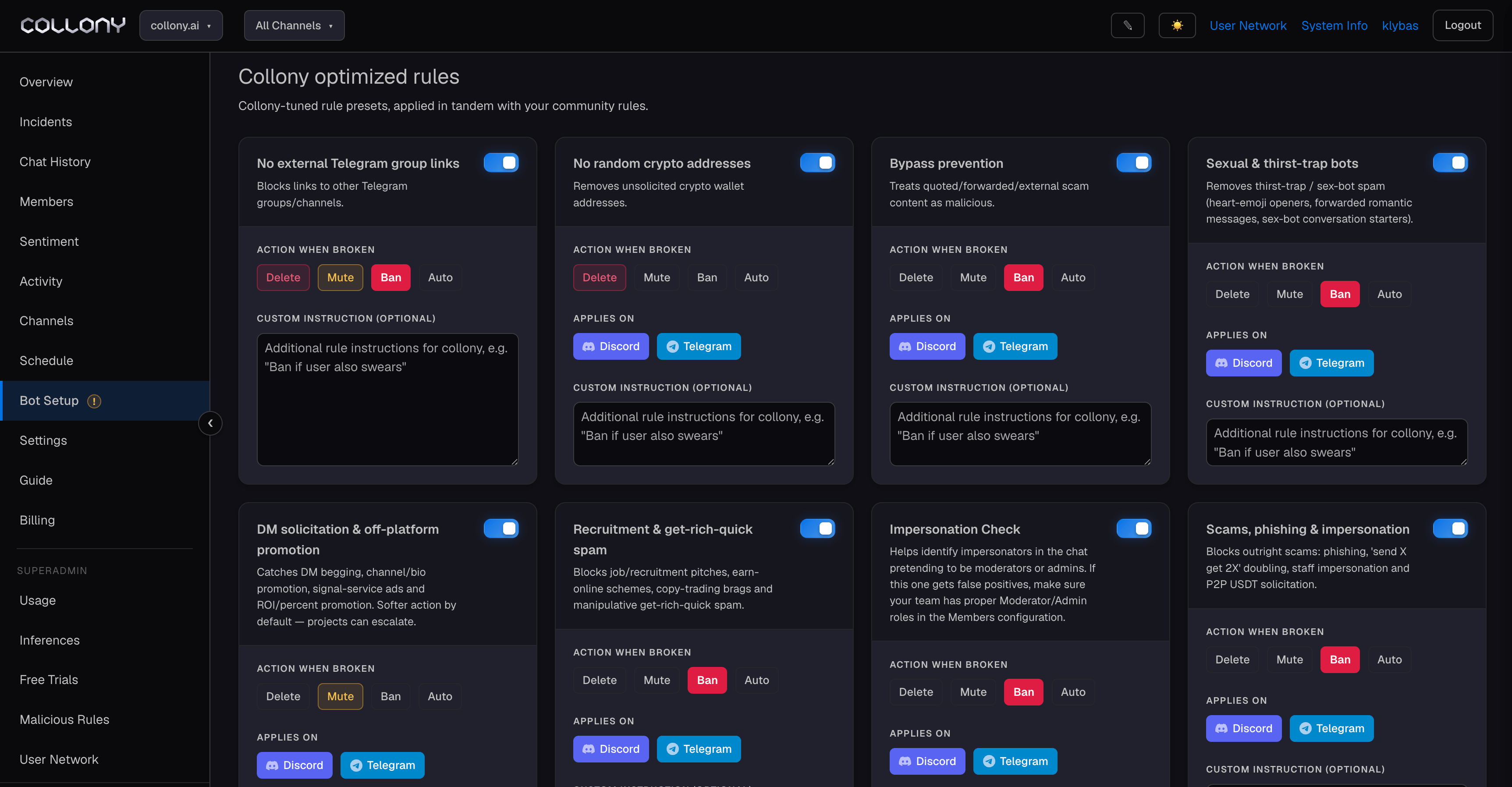
collony-optimized rules
RuleWhat it catches
No external Telegram group linksLinks to other Telegram groups or channels
No random crypto addressesUnsolicited wallet addresses
Bypass preventionQuoted, forwarded, or externally-linked scam content treated as malicious
Sexual & thirst-trap botsHeart-emoji openers, romantic DM starters, sex-bot spam
DM solicitation & off-platform promotionDM begging, channel/bio promotion, signal-service ads
Recruitment & get-rich-quick spamJob pitches, earn-online schemes, copy-trading spam
Impersonation checkUsers pretending to be moderators or admins
Scams, phishing & impersonationPhishing, scam links, and support impersonation
Enforce allowed language(s)Restricts chat to selected languages (English, Spanish, or custom)
Action options:
  • Auto - collony decides the appropriate action based on severity.
  • Delete / Mute / Ban - force a specific action regardless of severity.
Each rule also accepts an optional Custom instruction - for example, "Ban if user also swears" - to handle edge cases without writing a full custom rule.
If a preset generates false positives, check that your team members have the correct Moderator or Admin roles assigned in Members. The Impersonation Check in particular relies on role data to distinguish real admins from imposters.
Click Save all rules after making changes. Unsaved changes are flagged in the UI.
Last modified on June 19, 2026